The best trading apps for serious traders are as follows: SpreadEx offers the best overall mobile platform with it’s proprietary app; it’s smooth, has thousands of instruments and features Trading Signals for beginners. Pepperstone offers the widest range of mobile trading options with TradingView, MT4, MT5 and cTrader. IG offers a clean, simplified mobile trading experience, which is impressive given their range. Let’s dive in to see how these brokers perform across a variety of criteria.


Best CFD Trading Apps
If you are looking for a broker that excels at mobile trading, this guide is for you. We’ve analysed over 50+ brokers to determine the best trading apps for UK traders.
Quick Disclaimer: These results don’t include hybrid trading & investing apps like Trading 212, eToro, and Plus500, which offer mobile apps that combine trading and investing, but whose spreads are too wide for active trading and often don’t offer spread betting. This guide is intended for trading only, focusing on CFD trading and spread betting rather than ISAs and investments.
OK, with that out of the way, let’s look at the best trading apps for actual UK traders (not investors). Here’s how they performed.
Full Rankings (2026)
| Best for | Best trading app | Why it stands out |
|---|---|---|
| Best overall trading app | Our overall pick for active traders, combining Trading Signals, 10,000+ instruments, Reuters news and an easy-to-navigate proprietary app. | |
| Best low-cost trading app | Pepperstone combines its low-cost Razor account with a proprietary app plus cTrader, TradingView, MT4 and MT5 mobile options. | |
| Best trading app for beginners | IG combines Expert Analysis, analyst ratings, price targets and respected financial news, alongside IG Academy for newer traders. | |
| Best trading app for scalping | In our test it took roughly three seconds from opening the app to placing a trade, with one-tap trading and detailed instrument-level analysis available. | |
| Best copy trading app for active traders | Axi offers a dedicated trader-first CopyTrader app with strategy-level performance, drawdown, AUM and profitability data. | |
| Best mobile app for spread betting | Pepperstone is our low-cost mobile spread-betting pick, with forex spreads starting from 0.5 points and five mobile platform options. | |
| Best trading app for professional traders | FxPro stands out for technical analysis, market sentiment, analyst ratings, economic events and instrument-level news inside the app. | |
| Best broker for mobile platform choice | One broker gives you access to Pepperstone App, TradingView, cTrader, MT4 and MT5 on mobile. | |
| Best mobile app for European-style options | SpreadEx is unusual among the apps tested because European-style options can be traded directly on mobile, alongside its wider CFD and spread-betting range. | |
| Best mobile app for gold CFDs | Pepperstone offers Razor account gold spreads from 0.08 pips and lets you trade through its own app, TradingView or cTrader. |





Top 5 CFD Trading Apps Overall
For low spreads/fees on indices and stocks, a strong proprietary mobile app, and both CFD and spread betting options, SpreadEx and IG lead the pack. For a broker with a diverse range of potential apps, including cTrader, TradingView, and MT4 and MT5 mobile options, and the best for forex costs, Pepperstone is the best option. For deep technical and fundamental analysis, FxPro is a strong choice, and for an eToro copy-trading alternative, Axi CopyTrader is worth exploring.
Best Overall Mobile CFD App: SpreadEx
Best Forex Trading App & Low-Cost App: Pepperstone
Best Stock Trading App & Beginner App: IG
Best Technical and Fundamental Analysis: FxPro
Best Copy Trading App: Axi
If you want to spread bet on a trading app, Pepperstone offers the lowest-cost option, with spreads from 0.5 points, plus 5 mobile apps to integrate with: cTrader, TradingView, Pepperstone App, MT4, and MT5.
Video Summary
Verdict
Spreadex offers the best mobile trading app for active UK traders. Its proprietary app provides Trading Signals (integrated technical analysis support), a sleek, easy-to-navigate interface, and plenty of news across 10,000+ instruments,with stocks, commodities, and indices as one of the best low-cost options. It works well for both beginner traders, who will utilise Trading Signals, and more advanced traders, who can access European-style options.
IG is a great beginner alternative to Trading212 or Plus500. It offers 16,000+ instruments, and its app feels intuitive and easy to use. If you are looking to trade the S&P 500 or FTSE 100, then IG offers extremely low fees on index trading starting at just 0.4 points. They also offer regular ‘Expert Analysis’ on stocks, integrate news from The Wall Street Journal and have analyst price targets to show you the potential upside (or downside) of positions.
Pepperstone is the one-size-fits-all approach. They offer a wide range of integrations, like cTrader, TradingView, MT4, MT5 and a proprietary mobile app. They power their newsroom/analysis through a partnership with FxStreet and have a much higher update frequency than most major brokers. They remain the best option for low-cost forex trading.
1. SpreadEx: Best Overall CFD Trading App

SpreadEx: Best Mobile App
SpreadEx is a broker with a lot to offer. They provide detailed analysis, a clean setup, and over 10,000+ instruments to trade, all seamlessly from a mobile app.
70% of retail investor accounts lose money when trading CFDs with this provider. You should consider whether you understand how CFDs work and whether you can afford to take the high risk of losing your money.
Why SpreadEx is the Best Trading App
SpreadEx offers something unique. Alongside offering one of the widest ranges of instruments of any UK broker (10,000+), they also offer options trading for more advanced traders, a seamless MetaTrader-style platform with heaps of functionality, the latest news from Reuters, and Trading Signals for beginners. All of this combined makes them one of the most flexible proprietary apps for beginner to advanced-level traders.

They do all of this at a relatively good spread cost too, with spreads starting from 0.6 pips on forex pairs (in line with IG). You can check out our full review here. This makes them a highly competitive, often overlooked broker for mobile traders who prefer the big names.
Mobile App Experience
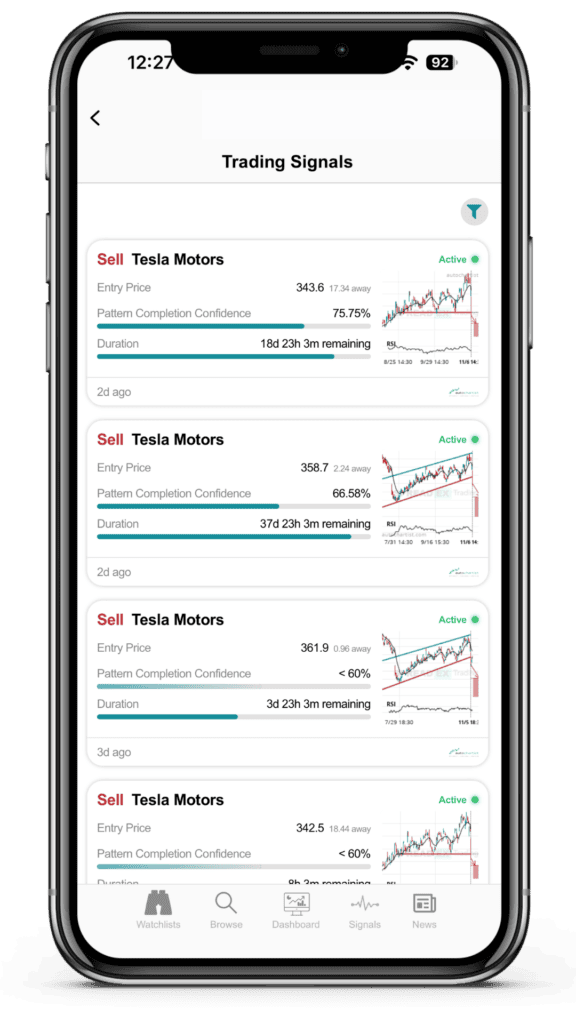
The first thing that stands out when you open their app is how simple it is to use (see below). One of the first things you’ll see is Trading Signals, showing potential setups across multiple forex pairs, commodities, and indices.
As a beginner trader, this is a fantastic feature to have front and centre, and no other mobile app does this; they all more or less insist you deposit ‘real money’ to start trading (lest they keep you on Demo for too long!). But SpreadEx has none of this hard-sell approach; instead, it focuses on guidance, education, and its instrument variety.
SpreadEx also categorises its instruments nicely (see below), first by ‘Popular Markets’, ‘Trending Markets’, Top Risers’, and ‘Top Fallers’, and by country.

This kind of structured approach avoids ‘App Overload’, where you are greeted by thousands of independent instruments, or where you are stuck trying to decide what to trade. It may sound small, but after analysing the best trading platforms in the UK, I can tell you it’s a welcome change!

Other Mobile Platforms
Where SpreadEx is slightly weaker is in its range of other mobile trading apps. Whilst Axi offers two proprietary apps (Axi ‘normal’ and Axi copytrader), and Pepperstone offers 5+ platforms, including TradingView, cTrader, MT4, MT5 and their own mobile app, SpreadEx only offers its own mobile app, desktop WebTrader, and TradingView.
So, if you are looking to potentially port SpreadEx to MT5, for instance, that won’t be possible, but the TradingView integration is great for beginners.
Key Mobile Trading FAQ’s for SpreadEx
Does SpreadEx have a good mobile app?
Whilst ‘good’ is relatively subjective, SpreadEx has a wide range of instruments, offers Trading Signals and provides detailed news coverage from Reuters. They also offer European-style options trading on mobile, which is distinct from other brokers. The interface is similar to MT4/MT5 but easier to navigate, better structured, and more beginner-friendly.
Is SpreadEx better than IG, Pepperstone, or CMC for mobile trading?
Broadly, yes, for the majority of traders, SpreadEx is more suitable. While Pepperstone offers more platform options like MT4 and cTrader, and IG offers better education with live feeds from the Wall Street Journal as well as its own proprietary ‘Expert Analysis’, SpreadEx offers a better proprietary app experience for beginners and advanced traders.
My Experience
We traded Tesla stock on SpreadEx’s spread betting account on 9th November 2026 from their mobile app. First, it was easy to find: go to Browse, Shares, then US Shares, and type it in. It takes less than 5 seconds (see below).

You can also view the latest news, Trading Signals, set price alerts, view the chart or start trading all from one screen within the instrument panel (see below).

Ultimately, SpreadEx combines both the depth you’d expect from a serious app, with the ease of trading you’d want when exploring 10,000+ instruments. The ease of use is reminiscent of IG, which makes instrument discovery super simple, but combine this with their Trading Signals, and it really is a lightweight, beginner-friendly app for trading multiple asset classes.

Verdict
SpreadEx has a lightweight, beginner-friendly app that makes it simple to discover and trade instruments across asset classes and explore international shares. They combine this with tight spreads, in line with IG for most instruments (from 0.6 pips on FX pairs), and never leave you wondering what you can trade. Given their 10,000+ instruments, it’s an all-round exceptional app that makes discovery, education, and trading an easy-to-use, integrated process.

£5 Minimum Deposit
Best Mobile App
SpreadEx is a broker that just works. Easy to use, great professional feel and exceptional proprietary platforms.
Spread bets and CFDs are complex instruments and come with a high risk of losing money rapidly due to leverage. 61% of retail investors lose money when trading spread bets and CFDs with this provider. You should consider whether you understand how spread bets and CFDs work and whether you can afford to take the high risk of losing your money.
2. Pepperstone: Best Forex Trading App
Pepperstone: One Broker, Five Platforms.
Pepperstone is the broker that will fit most people’s needs. Fancy cTrader? Done. Want TradingView? Covered. Ultimately, if you want to trade your way,, Pepperstone is the top choice.
73.6% of retail investor accounts lose money when trading CFDs with this provider. You should consider whether you understand how CFDs work and whether you can afford to take the high risk of losing your money.
Why Pepperstone is a Good Mobile Broker
Beyond the tight spreads and great customer support, Pepperstone offers the widest range of free platforms and mobile app integrations for UK traders. They offer cTrader, TradingView, MT4, MT5 and their own proprietary mobile app. You essentially get 5 platform options with one broker.
Mobile App Experience
So Pepperstone also has its own Pepperstone App that you can download from the App Store (see below), or you can download cTrader, TradingView, MT4, or MT5 and connect Pepperstone to the platform yourself. I did this with Pepperstone on cTrader (see ‘Our Experience’), and it is remarkably easy, simply enter the email and password you used to sign up for Pepperstone, and you are in.

What you notice with Pepperstone’s proprietary app compared to SpreadEx is that it’s very news-driven. They show the latest news at the bottom of the screen (see below) and link it to the relevant instruments, which is a great feature if you are looking for alerts on particular instruments.

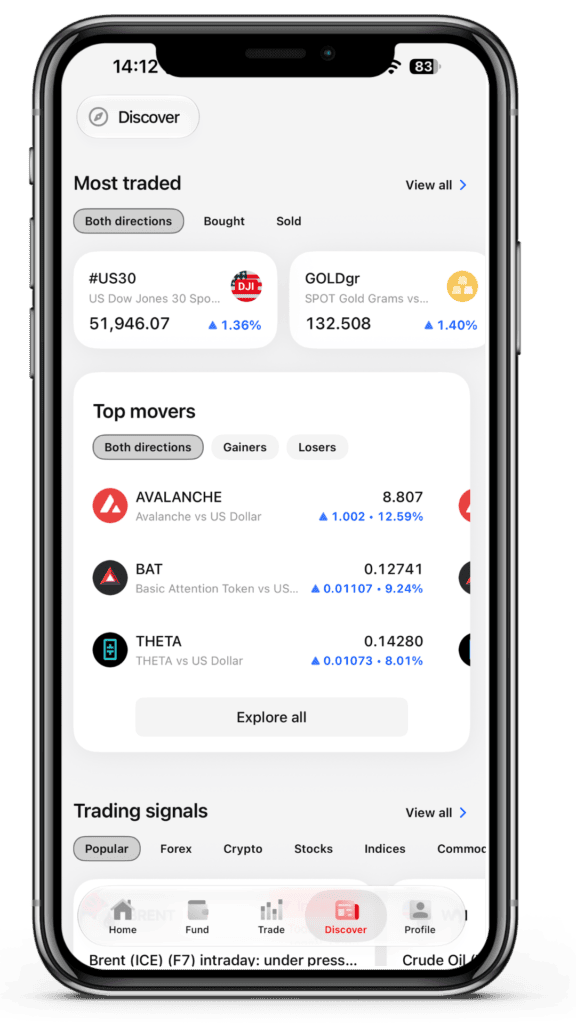
In terms of similarities, they have pre-built watchlists, like SpreadEx, for trending instruments and popular markets. If you head over to the ‘Discover’ tab, you will see the most-traded instruments by volume, top gainers, top losers, and even a market heatmap (see below).

Essentially, Pepperstone’s ‘Discover’ tab is more like an Ironman-style dashboard where you look at the market from a 30,000-foot view and can analyse your next move, which feels different to SpreadEx’s more hands-on Trading Signals approach.
Other Mobile Platforms
So this is Pepperstone’s forte. They offer multiple platform integrations, meaning that whatever your preferred platform, Pepperstone likely has it. They cover TradingView, cTrader, MT4, and MT5, in addition to their proprietary mobile app. Connecting to TradingView and cTrader is simple and takes seconds in our testing (15s to be exact); given the need to enter markets quickly, this might be a deciding factor. If you are a scalper, I’d recommend Pepperstone’s proprietary app, as you’ll be able to log in faster without having to connect/integrate and wait for the connection.
Key Mobile Trading FAQ’s for Pepperstone
Does Pepperstone have a good mobile app?
Pepperstone’s proprietary app is great. It offers a market heatmap, trending instruments, volume analytics across instruments, and more. It also features FXStreet insights on individual instruments, so up-to-date news and information make it a great choice. They also offer multiple platform/app integrations, including TradingView, cTrader, MT4, and MT5, meaning algorithmic mobile trading is possible with Pepperstone, and they offer the widest range of algorithmic mobile trading options.
Is Pepperstone’s Proprietary App Better than cTrader, TradingView and MetaTrader integrations?
It depends. If you prefer news-based trading or want to look at the markets from a 30,000-view before getting involved, then yes, Pepperstone’s proprietary app will support your trading much more than a straight integration. However, if you want to automate your trading, the native Pepperstone app doesn’t offer this option, and you’ll need to use an integration.
My Experience
We tested Pepperstone’s proprietary app as well as their cTrader mobile integration on 9 November 2026. Ultimately, what we found was that scalpers will prefer the proprietary mobile app, while swing traders, position traders and day traders may prefer the charting tools of third-party platforms.
Connecting to third-party integrations takes time every time you load them. This latency in mobile connections may affect scalping, so I’d choose the Pepperstone proprietary app. If you want to automate your trading, however, the best mobile app we found was cTrader, with a cBot you can turn on and off from your mobile phone (see below).

You also get ‘Signals’ on Pepperstone’s cTrader, which are similar to SpreadEx’s Trading Signals, so this is another added benefit of using Pepperstone’s cTrader app (see below).

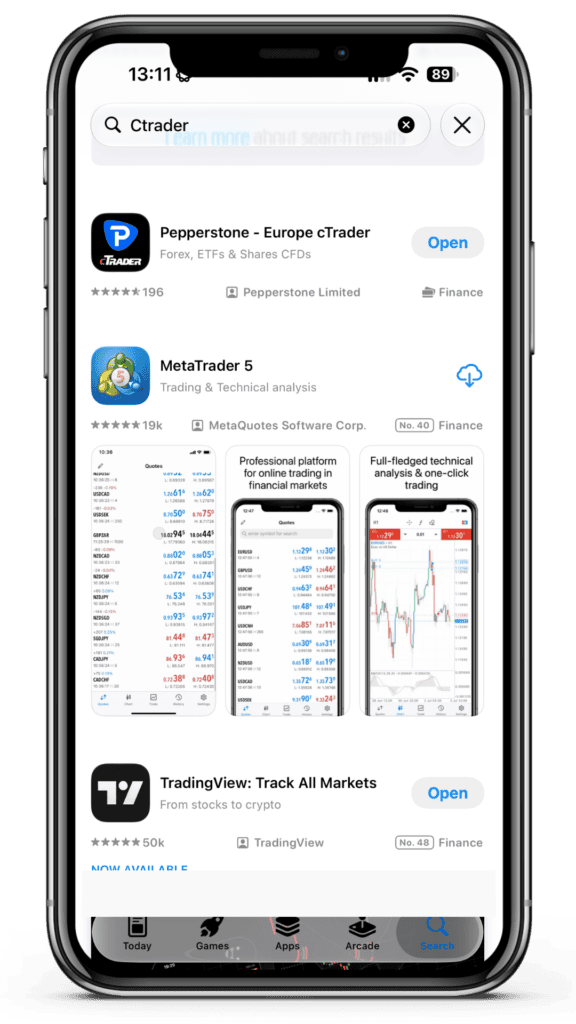
Something to also be aware of is that you will need to download the app called Pepperstone – Europe cTrader, rather than just typing in cTrader and downloading the SpotWare app (see below). This is crucial, as most traders (myself included!) just thought I could download the SpotWare app. If you have any difficulty finding this, though, you can always reach out to Pepperstone’s support team.
Verdict
Pepperstone is renowned as one of the lowest-cost spread betting and CFD brokers with its Razor Account. They are also known for their platform diversity, which translates well to mobile trading, with TradingView, cTrader, MT4, and MT5 apps available. Their proprietary Pepperstone app might lack the technical naouse of SpreadEx, but it more than makes up for it with their Discover tab, which functions like a command centre for the markets. On their cTrader app, you also get the same kind of ‘Trading Signals’ feature as with SpreadEx, and you also get access to cBots for automated trading. I’d recommend Pepperstone’s mobile app options if you want to automate trading, want a command centre-style view of markets, or want to port your current setup to other platforms to see how they feel.

£10 Minimum Deposit
Best for Forex
Pepperstone is a Melbourne-based broker that offers an excellent range of assets in the financial trading markets, including CFD's for commodities, shares, ETFs and more.
73.6% of retail investor accounts lose money when trading on margin with this provider.
3. FxPro: Best Trading App for Technical Analysis
FxPro: Best for Analysis
If you want a quick view of the markets from a variety of news sources, analyst ratings, and technical analysis signals at a glance, FXPro is for you.
68% of retail investor accounts lose money when trading CFDs with this provider. You should consider whether you understand how CFDs work and whether you can afford to take the high risk of losing your money.
Why FxPro is a Great Mobile Broker
We’ve had our issues with FxPro in the past…namely their ridiculously high $400 minimum deposit for a Raw account (similar account type to a Pepperstone Razor account but just way more expensive…). However, where FxPro really proves their worth is their mobile app. It incorporates technical analysis signals, analyst ratings, the widest variety of news sources of any mobile app and easy navigation for quick instrument discovery. It really is a pro-level mobile app. However, with spreads starting at 1.2 pips on a standard account, it is significantly more expensive than most other brokers unless you use their Raw account.

Mobile App Experience
What stands out about FxPro is that as soon as you open the app, you are taken to their ‘Popular instruments’ tab under ‘Trade’ – this means that if you are looking to get a trade executed quickly, there is almost no better experience. The UI is particularly clean, with Blue and Red for buy and sell, respectively, and you can quickly swipe through asset classes like stocks, forex, and commodities in the top bar. This makes it one of the fastest apps for executing trades (see below).

Additionally, the instrument panel includes the day’s price range, technical analysis for short, intermediate, and long-term time horizons, and trading signals. It also shows upcoming events, market sentiment, and related news.

There is so much information, but unlike other apps, it’s so well-presented that you can take it all in within seconds. It’s genuinely one of the best apps if you are looking for instrument-level news and data.
A drawback here is that you might find their news sources to be less reputable than IG, but perhaps more actionable. They feature news from BullionVault, Investing News and Action Forex. I’ve never heard of these sources, to be honest, but I don’t disagree with the analysis; frankly, the news is instrument-specific anyway, so sources vary (see below).

Overall, FxPro is like Clint Eastwood: you open the app like a quick draw, absorb the information and start trading in seconds. It’s remarkably quick.
Other Mobile Platforms
FxPro is also a powerhouse for trading platform/mobile app options. Besides its proprietary app, it also offers TradingView, cTrader, MT4, and MT5. This matches Pepperstone in terms of mobile app options. Frankly, we can’t find a flaw with FxPro’s app options, they offer more free platform options than IG and SpreadEx and their proprietary mobile app is quick and easy to use for all kinds of traders from beginner to advanced, equally by adding cTrader and TradingView they appeal to algorithmic traders and beginners alike.
Key Mobile Trading FAQ’s for IG
Does FxPro have a good mobile app?
Yes. In our testing, FxPro has one of the best mobile apps for UK traders: it’s responsive, has a great UI, features diverse news sources, and offers plenty of alternatives, like cTrader and TradingView. Its instrument-level breakdown is also extraordinary, with analyst ratings, market sentiment indicators, daily range, technical signals, and upcoming events that might impact the instrument. Overall, it’s hard to fault FxPro.
Is FXPro better than IG, Pepperstone or SpreadEx for Mobile Trading?
FxPro is better for scalpers because of its low-latency app, comprehensive information, and easy-to-understand interface. The only comparable proprietary app is SpreadEx. Pepperstone and FxPro are roughly equal; they both offer 5 free mobile app options: TradingView, MT4, MT5, and cTrader, as well as their proprietary app, but Pepperstone has the advantage of a cheaper ECN account; Pepperstone’s Razor account is the cheapest for UK traders.
My Experience
We traded Gold on 9th November 2026 on FxPro’s mobile app, and it took 3 seconds from opening the app to placing a trade. That’s how quick it is; now, mind you, we didn’t do any additional technical analysis or research before placing the trade, which is easy enough to do from the instrument panel (see below), but in our testing, this was by far the quickest loading speed to execution we found of any mobile app.

Here are the technical analysis indicators of market sentiment we scanned before the trade (powered by Trading Central).

You can also set up ‘One-Tap Trading’ if you go into settings, so you don’t need additional confirmation if you want to trade quickly. You can also adjust the colours, theme, security settings (enabling Face ID) and more.

Verdict
FxPro’s app really can’t be faulted. The unique combination of tools and features is truly extraordinary: technical analysis, market sentiment, expert analyst ratings, news (including their own proprietary analysis), economic events, and intraday trading ranges. A minor drawback is that they could benefit from more reputable news sources powering their analysis, but they make up for it with a diverse range of sources, their own proprietary analysis, and everything else an active trader might need. If you are a scalper (i.e., an active trader who needs to get in and out of the market quickly), I would seriously consider FxPro’s Raw account, where pips start at 0.0 + a $3.5 commission per side. It’s more expensive than Pepperstone, but if you are primarily a mobile trader, then this might be the choice for you.

£0-500 Minimum Deposit
Best Execution Speeds
FxPro is an intermediate-to-advanced-level broker with no frills. They offer great spreads, multiple platform integrations, and a strong mobile app, and with sub-8ms execution speeds, they are hard to beat.
CFDs and Spread Betting are complex instruments and come with a high risk of losing money rapidly due to leverage. 75% of retail investor accounts lose money when trading CFDs and Spread Betting with this provider. You should consider whether you understand how CFDs and Spread Betting work and whether you can afford to take the high risk of losing your money.
4. IG: Best Trading App for Beginners & Stocks

IG: Best Beginner App for Trading & Investing
IG has proven itself to be a well-regulated,, trusted broker for both trading and investing, but its app leaves something to be desired.
69% of retail investor accounts lose money when trading CFDs with this provider. You should consider whether you understand how CFDs work and whether you can afford to take the high risk of losing your money.
Why IG is a Great Mobile Broker
Whilst we said we weren’t going to cover investing apps, I think IG is worth exploring for trading as well. Unlike Trading 212 or eToro, IG actually offers trader-friendly spreads starting from 0.6 pips. Whilst they aren’t as competitive as Pepperstone, they are certainly better than Trading 212 and Plus 500, where spreads can reach 1.2 pips or higher. IG’s app also isn’t the best, but it offers something only a few other brokers on this list do for beginners: great educational resources & proprietary ‘Expert Analysis’.

Mobile App Experience
IG’s mobile app is a bit odd. Instead of offering a trader-friendly, volume-based instrument list, trending instruments, or a focus on commodities, forex, or indices, they push traders toward stocks, with their most popular list showing Microsoft, Tesla, and Nvidia (see below).

They also seem to reinforce this stock-led approach with ‘Ready-Made Portfolios’ powered by BlackRock that focus on iShares ETFs (see below). Great. Well, not exactly. The prominence they give these portfolios is slightly odd, and you start thinking… what is in it for IG to promote these iShares ETFs so heavily? I guess we’ll never know…

To IG’s credit, they do have some thematic buckets like ‘Aerospace’ and ‘Electric Vehicles’, which makes navigating across themes easy enough, but their ‘Discover’ tab is seriously lacking. They feature News, an Economic Calendar, IG’s own ‘Expert Analysis’ (more on that in a second), and the ‘Ready-Made Portfolio’, again.

However, navigating IG’s app feels odd; it lacks the polish of WebTrader, where moving from exploration to trading is seamless. On their app, you are pushed toward certain instruments and portfolios, rather than guided on what is trending across asset classes or where key movements/breakouts are happening now. That is why SpreadEx’s mobile app feels much better suited to most traders than IG.
Other Mobile Platforms
IG also offers the second-most freely accessible platforms/apps for mobile traders, including TradingView, MT4, MT5, and its IG app. While they lack cTrader, they offer ProRealTime, which also has a mobile app, which is great. A total of 5, the same as Pepperstone, except ProRealTime is a paid platform like TradingView, so in reality it’s more like 3 free apps.
Key Mobile Trading FAQ’s for IG
Does IG have a good mobile app?
For investors, yes. For traders, not really. IG’s mobile app focuses more on ‘portfolio building’, even naming the homepage on their app ‘IG Portfolio’ and featuring BlackRock’s ‘Ready-Made Portfolios’. For traders who want to see trending instruments across a diverse range of asset classes, not just stocks or ETFs, or who want to explore breakouts, technical analysis, or heatmaps of what is actually happening in markets, IG falls massively short.
Is IG better for traders or investors?
Their WebTrader is good for both. Their mobile app, however, is built more for investors than traders, unfortunately. You still get the same great spreads when trading, and these spreads are more competitive than other non-trading brokers like Trading 212 or Plus 500, but if you are looking for an app where you can actively trade multi-asset instruments, then whilst IG has the range, they lack the ease of navigation, fall short of the nice discoverability of their WebTrader, and generally miss the mark on their mobile app instead focusing on ETF and share dealing.
My Experience
We traded Nvidia on 9th November 2026 to test the trading experience. Ultimately, we found a few standouts on IG that other brokers lack.

They integrate ‘Analyst ratings’, ‘Analyst price targets’, P/E ratios, market cap and dividend yields at a glance, all nicely designed and well structured (see below).

Their news section came from The Wall Street Journal and Barron’s, respected institutions, and the relevant news on that stock appeared within the instrument panel itself (see below).

On their homepage, they featured ‘Expert Analysis’. It’s worth pausing here. We’ve spoken about IG Academy before, and their market commentary is oamongthe best in the industry; this ein-app xpert analysis is the cherry on top.

While it doesn’t cover breaking news (WSJ and other sources do), this analysis focuses on technical analysis (finally!).
Verdict
IG’s mobile app is disappointing compared to the ease of use you find on its WebTrader. If you are an active trader, you’ll find more utility from SpreadEx or Pepperstone than IG. IG focuses on helping you build a portfolio of shares and ETFs, generally for longer-term investors rather than traders, whilst, surprisingly, their ‘Expert Analysis’ focuses on technical analysis. If you are a heavy stock trader, IG might be useful, but for multi-asset, active, or professional traders, SpreadEx’s proprietary app is a better fit.

No Minimum Deposit
Best for Stocks
IG offers 17,000+ trading instruments and combines robust regulation with cutting-edge platforms like ProRealTime, TradingView, and L2 Dealer.
70% of retail investor accounts lose money when trading CFDs with this provider. You should consider whether you understand how CFDs work and whether you can afford to take the high risk of losing your money.
5. Axi: Best Copy Trading App for Active Traders
Axi: Best Copy Trading App for Active Traders
Axi offers two apps: their primary app and a copy trading app. We’ve looked at their copy trading app, and it’s pretty impressive.
83% of retail investor accounts lose money when trading CFDs with this provider. You should consider whether you understand how CFDs work and whether you can afford to take the high risk of losing your money.
Why Axi is a Great Mobile Broker
I know what you are thinking… Axi for the best copy trading app!? What about eToro? Well, let’s compare them side by side for active traders. Whilst Axi’s copy trading app may be newer (2 years old according to the App Store) and therefore offer fewer options (we counted 328 low-drawdown strategies), Axi has a distinct advantage over eToro: cost. eToro’s spreads start at 1 pip on FX pairs, while Axi starts at 0.68 pips (nearly 50% cheaper per trade).

Their copy trading app is also designed for what it says on the tin ‘copy trading‘ whereas eToro is more focused on ‘copy investing‘. Now, granted, you might be a swing trader or position trader and prefer eToro, but Axi offers something hard to come by: a copy trading app focused on actual traders.
Mobile App Experience
Now I won’t pretend Axi’s copy trading app is something special. It isn’t, especially when compared to the other apps on this list. However… if you are actually serious about copy trading (i.e., set-and-forget trades), you will like what they offer.

They offer strategies rather than eToro’s people-first method. Now, to be honest, it’s a bit disconcerting to trust a strategy with an AI-generated image with your trade rather than a named person (see below), but it’s actually really similar to how cTrader does this on their cBots and how they used to do it with their cTrader CopyTrade feature – now discontinued in the UK. So it’s hardly a novel concept, but it felt a bit odd to me after years of trading on eToro’s copy trader with real people behind it.

You only get two tabs: ‘Discover’ and ‘Account’ again, not the widest range of options here. But once you get into a strategy, it shows you the return, the fee, the timeframe over which that return was gained, what instruments were traded, the profitability, unrealised P/L, maximum drawdown, copiers’ profit, AUM and how many traders there are each month.

This is a good range of information overall, but there is nothing about whether it’s a day trading, swing trading or short-term trading strategy and much, much more.
Verdict
If you are looking for an eToro copy trading alternative, then Axi is one of the only brokers in the UK to offer it. While the app has its flaws, it’s a practical, trader-first copy trading app rather than an investment/long-term copy trading app, which is worth bearing in mind.
No Minimum Deposit
Best for Copy Trading
Axi is a relatively new broker, founded in 2007, but offers a rare combination of benefits for UK traders like copy trading, spread betting and tight spreads. This challenger broker is making a name for itself in the UK.
CFDs are complex instruments and come with a high risk of losing money rapidly due to leverage. 72.47% of retail investor accounts lose money when trading CFDs with this provider. You should consider whether you understand how CFDs work and whether you can afford to take the high risk of losing your money.
How to Choose a Trading App
Methodology
To determine the best trading apps for UK traders, we analysed factors such as mobile experience, instruments, spreads, and features. We analysed 50+ brokers to determine the ‘best’. Here is what we went through in our hands-on testing:
- Spread Cost (10%): We explore spread costs in depth across our guides to the best spread betting brokers and the best CFD brokers. Whilst we don’t explore spread costs deeply in this article, they still affect the overall ranking. Instead, we place more emphasis on app quality. Pepperstone scored the best on spread costs overall.
- Ease-of-use (30%): We analyse how easy it is to go from opening the app to finding an instrument and placing a trade. We assess how intuitive, well-designed, and beginner-friendly the app is for all users. SpreadEx and FxPro scored highly here.
- Instrument Range (10%): A diverse asset range is crucial for trading, as you don’t want to be left short on instruments you can’t find or that don’t exist. Spreadex and IG performed best here, with 10,000+ and 16,000+ instruments, respectively, compared to Pepperstone and FxPro’s 2,100+.
- App Features (40%): The best apps offer the best news sources, unique expert analysis, technical analysis signal detection, upcoming economic events, and proprietary features that set them apart from the competition. SpreadEx and FxPro scored well in this category, and Axi’s copytrader also earned points due to the copytrader app’s relative uniqueness.
- Platform Options (10%): Beyond a proprietary app, does the broker have any other mobile integrations available, like TradingView, cTrader, ProRealTime, etc. IG, Pepperstone and FxPro all scored well here.
Supporting Data
We also relied on our broker-matching quiz data to support our findings across beginner, intermediate and advanced trader preferences (see below). This helped guide our ranking criteria in addition to the above.
We also used real App Store reviews and rankings to support this methodology, looking across multiple broker apps, their star ratings and feedback, and update frequency.
Trading Brokers · First-party research
Mobile Trading: What Our Readers Prioritise
We analysed 94 quiz sessions that rated a strong mobile trading app important or very important. Here is how their experience, broker priorities, platform preferences and market interests compare.
Who is included: Only respondents who prioritised a mobile app. The quiz measured preferences, not actual mobile trading activity.
What else matters to respondents who prioritise mobile trading?
Important or very important · 94 qualifying sessions · all five questions answered.
Customer support: 84 of 94 (89.4%) rated this important or very important. Very important: 34 (36.2%); important: 50 (53.2%); not important: 10 (10.6%).
Select a bar to see its exact counts.
How experienced are respondents who prioritise mobile trading?
Share of the 94 qualifying sessions · one self-identified experience level per session.
Beginner: selected in 55 of 94 mobile-priority quiz sessions (58.5%). Experience is self-identified.
Select a bar to see its exact counts.
| Preference | All mobile n=94 | Beginner n=55 | Intermediate n=26 | Advanced n=13 |
|---|---|---|---|---|
| Customer support | 89.4% (84/94) | 90.9% (50/55) | 84.6% (22/26) | 92.3% (12/13) |
| Tight spreads | 88.3% (83/94) | 83.6% (46/55) | 92.3% (24/26) | 100.0% (13/13) |
| Deposit options | 68.1% (64/94) | 74.5% (41/55) | 57.7% (15/26) | 61.5% (8/13) |
| Automated trading | 60.6% (57/94) | 67.3% (37/55) | 46.2% (12/26) | 61.5% (8/13) |
| Educational resources | 59.6% (56/94) | 70.9% (39/55) | 46.2% (12/26) | 38.5% (5/13) |
Percentages are within each experience group and combine “important” with “very important”. Counts show selected / group total. Everyone included prioritised mobile trading, so it is not ranked again. The advanced group has only 13 sessions.
Which platforms does this mobile-priority group prefer?
Share selecting each option · 94 qualifying sessions · multiple selections allowed.
TradingView: selected in 40 of 94 mobile-priority quiz sessions (42.6%). More than one option could be selected.
Select a bar to see its exact counts.
Which markets interest respondents who prioritise mobile trading?
Share selecting each asset class · 94 qualifying sessions · multiple selections allowed.
Forex: selected in 56 of 94 mobile-priority quiz sessions (59.6%). More than one option could be selected.
Select a bar to see its exact counts.
View the data tables Exact counts, percentages and experience breakdowns
| Feature | Very important | Important | Not important | Answered | Important or very important |
|---|---|---|---|---|---|
| Customer support | 34 | 50 | 10 | 94 | 89.4% |
| Tight spreads | 37 | 46 | 11 | 94 | 88.3% |
| Deposit options | 20 | 44 | 30 | 94 | 68.1% |
| Automated trading | 19 | 38 | 37 | 94 | 60.6% |
| Educational resources | 26 | 30 | 38 | 94 | 59.6% |
| Mobile trading | 44 | 50 | 0 | 94 | 100.0% |
Rating columns show counts. Mobile app importance defines the group: 44 rated it very important and 50 important. Combined percentage = (important + very important) ÷ valid answers × 100.
| Experience | Selected | Answered | Selected (%) |
|---|---|---|---|
| Beginner | 55 | 94 | 58.5% |
| Intermediate | 26 | 94 | 27.7% |
| Advanced | 13 | 94 | 13.8% |
| Preference | All mobile n=94 | Beginner n=55 | Intermediate n=26 | Advanced n=13 |
|---|---|---|---|---|
| Customer support | 89.4% (84/94) | 90.9% (50/55) | 84.6% (22/26) | 92.3% (12/13) |
| Tight spreads | 88.3% (83/94) | 83.6% (46/55) | 92.3% (24/26) | 100.0% (13/13) |
| Deposit options | 68.1% (64/94) | 74.5% (41/55) | 57.7% (15/26) | 61.5% (8/13) |
| Automated trading | 60.6% (57/94) | 67.3% (37/55) | 46.2% (12/26) | 61.5% (8/13) |
| Educational resources | 59.6% (56/94) | 70.9% (39/55) | 46.2% (12/26) | 38.5% (5/13) |
Percentages are within each experience group and combine “important” with “very important”. Counts show selected / group total. Everyone included prioritised mobile trading, so it is not ranked again. The advanced group has only 13 sessions.
| Preference | All mobile n=94 | Beginner n=55 | Intermediate n=26 | Advanced n=13 |
|---|---|---|---|---|
| TradingView | 42.6% (40/94) | 45.5% (25/55) | 46.2% (12/26) | 23.1% (3/13) |
| Don’t mind | 36.2% (34/94) | 40.0% (22/55) | 23.1% (6/26) | 46.2% (6/13) |
| MetaTrader 5 (MT5) | 29.8% (28/94) | 30.9% (17/55) | 26.9% (7/26) | 30.8% (4/13) |
| cTrader | 13.8% (13/94) | 9.1% (5/55) | 19.2% (5/26) | 23.1% (3/13) |
| MetaTrader 4 (MT4) | 12.8% (12/94) | 12.7% (7/55) | 11.5% (3/26) | 15.4% (2/13) |
Each percentage uses its column’s group total. Multiple selections can exceed 100% in total. “Don’t mind” includes 30 sessions selecting only that option and 4 also naming a platform. Platform preferences do not distinguish mobile from desktop or web use.
| Preference | All mobile n=94 | Beginner n=55 | Intermediate n=26 | Advanced n=13 |
|---|---|---|---|---|
| Forex | 59.6% (56/94) | 58.2% (32/55) | 61.5% (16/26) | 61.5% (8/13) |
| Stocks | 58.5% (55/94) | 60.0% (33/55) | 50.0% (13/26) | 69.2% (9/13) |
| Indices | 39.4% (37/94) | 32.7% (18/55) | 61.5% (16/26) | 23.1% (3/13) |
| Commodities | 38.3% (36/94) | 32.7% (18/55) | 57.7% (15/26) | 23.1% (3/13) |
Each percentage uses its column’s group total. Market choices can overlap. Of the 94 sessions, 57 selected multiple asset classes and 37 selected one.
Source & method: TradingBrokers.co.uk broker-matching quiz, 11 February 2025–10 October 2026. We kept the latest response per session from 212 submissions, giving 119 sessions, then selected the 94 rating a strong mobile app “important” or “very important”. We excluded 20 “not important” responses and 5 missing answers. Percentages use 94 for the whole group or 55, 26 and 13 for beginner, intermediate and advanced comparisons, rounded to one decimal place. This self-selected sample records preferences, not verified unique people or a representative UK survey. Actual mobile usage was not measured.
In our data on mobile trading, respondents noted that during mobile trading, the range of stocks and forex was equally important. TradingView was the preferred alternative platform, and tight spreads were also seen as important. Crucially, beginner traders were more likely to rate mobile trading as a high priority; in fact, it was one of their highest priorities vs education, deposit types, etc.
Other Data
To further support our methodology, rationale, and weightings, we also assessed star ratings across all broker apps. As. As of the time of writing, SpreadEx and IG both led the pack with 4.6 stars onApp Storestore, and FxPro had 4.4 stars, Pepperstone had 4.1, and Axi’s copyTrader had 4.2. The highest-rated app on the App Store overall was Capital.com at 4.7. However, the App Store rating reflects user satisfaction with their own experience, not a holistic view across all apps, which we conducted for this review. Whilst we found Capital.com’s app sufficient, it lacked many of the features we liked on FxPro and felt much simpler than competitors.
Limitations & Rationale
This list is our definitive guide for active trading apps. I purposefully didn’t include investing-focused apps. Whilst many traders use Trading 212 or eToro, these apps combine investing, ISAs, SIPP investments, and trading, so I’ve purposefully excluded them, as this list focuses on CFD trading and spread betting.
Other Brokers We Considered
As part of our research, we considered major UK FCA-regulated brokers, including CMC Markets, Capital.com, Tradenation, Plus500, Trading 212, eToro, Vantage Markets, EightCap, and more.
To produce these results, we assessed all FCA-regulated broker offerings using the ‘Methodology’ mentioned above and found on our homepage.
FAQs
Best Mobile App for CFD Trading
If you are looking for the lowest CFD trading costs for mobile trading, Pepperstone’s Razor account offers the best low-cost option. If you want a non-commission-based Standard CFD account, SpreadEx is our choice for mobile trading on a standard account, but CMC Markets offers the most competitive standard account fees; however, CMC’s mobile app is harder for beginners and even advanced traders to navigate.
Best Mobile App for Forex Trading
If you are specifically looking for a mobile app to trade forex, then Pepperstone would be the best choice given its low spreads and easy-to-use mobile platform, so it’s suitable for beginners and more advanced traders.
Best Mobile App for Index Trading
If you want to trade S&P 500 or FTSE 100 indices, then IG offers the lowest cost starting from just 0.4 points, and its overnight fees are in line with CMC Markets, so it offers a great place to buy-and-hold indices.
Best Mobile App for Spread Betting
Pepperstone offers the lowest spread betting costs and its own proprietary mobile app, with forex spreads starting at 0.5 points.
Best Mobile App for Beginner Traders
If you want an easy-to-use app with thousands of instruments, SpreadEx and IG are the best options. SpreadEx offers Trading Signals for technical analysis support, and IG also has IG Academy and plenty of free educational materials for beginners. IG also integrates WSJ articles, so it’s a good starting point.
Best Mobile App for Gold CFDs
Pepperstone offers the lowest Gold CFD spreads, starting at 0.08 pips, on its Razor Account. You can also trade through the TradingView app, the cTrader app, or its proprietary app.
Best Mobile App for Professional Traders
If you want deep analysis and a range of technical and fundamental factors to decide whether to enter a trade, FxPro’s proprietary mobile app stands out for professional traders. If you want a wide range of stocks, ETFs, and portfolio-led options to trade, SpreadEx and IG are good options, with SpreadEx as a particular mobile standout because you can trade European-style options.

- Best CFD Trading Apps in the UK - November 23, 2026
- FxPro vs Pepperstone: Broker Comparison - November 18, 2026
- Best CFD Brokers for UK Traders - October 28, 2026